
Help Center
Installing SEEP Mobile Application
SEEP Mobile Application Installation Step-by-Step
Getting Started
Device Compatibility and System Requirements
✅ Compatible with Android and iOS devices.
✅Requires Android version 8.0 or later / iOS version 12.0 or later.
✅Stable internet connection for syncing data.
Downloading and Installing the App
SEEP Mobile Application for Android Users
- Click here [SEEP Mobile Application]
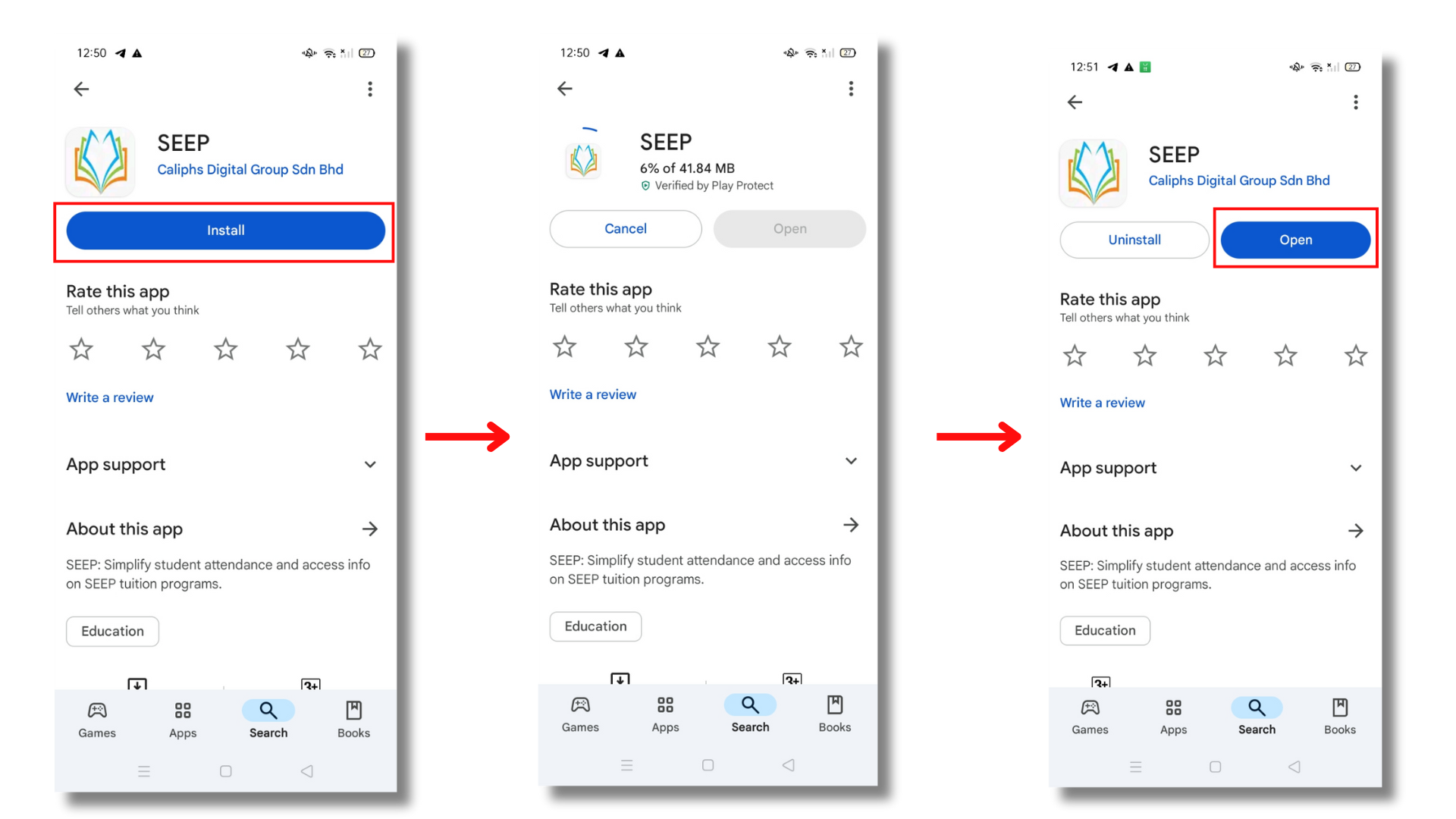
- Users will be directed to the application on GooglePlay
- Tap on [Install] button to install the application and wait for the installation to complete
- When installation is done, tap [Open] to open the application
SEEP Mobile Application for iOS Users
Currently, the SEEP Mobile Application is not yet available on the Apple App Store. However, we are actively working on making the app accessible for iOS users soon.
What Can iOS Users Do?
Stay updated by checking our official announcements on SEEP Portal: www.seep.com.my
Contact our support team for any inquiries. We appreciate your patience and support. Stay tuned for updates on the official release !